
After China opened its visa-free policy, many people started preparing to travel, work, or study abroad again. Students who plan to study in China no longer have to rely only on online classes. However, one important thing to prepare before traveling is a China VPN. A VPN for China can help you access the internet, apps, and websites more smoothly while using a VPN in China.
This article will consist of...
- What to Know When Using a VPN for Traveling to China or Choosing a China VPN
- Preparing Yourself Before Traveling to China
- Best Practices When Using BullVPN in China
- Common Issues When Using BullVPN in China Important
- Other Challenges to Prepare for When Traveling to China
- Which VPN Should I Use in China? BullVPN Recommendation
For BullVPN users planning to travel, study, work, or reside in China, you can use BullVPN to bypass various blocks and restrictions in China. This includes access to social networks, Facebook, Instagram (IG), Line, Telegram, Gmail, Hotstar TH, Viu, iQIYI, YouTube, and other blocked websites. BullVPN can be used on many devices, including Windows, Mac, iPhone & iPad, Android, Chrome Extension, and Smart TVs. This makes BullVPN a suitable option for users looking for a China VPN, VPN for China, or VPN that works in China before and during their trip.
What to Know When Using a VPN for Traveling to China
The People's Republic of China has legal restrictions regarding the use of VPNs within the country, making VPN usage in China more challenging depending on the location, network, and timing. Based on the experiences of VPN users in China, you may experience occasional disconnections, unstable speeds, slow internet, or difficulty connecting at certain times. If this is your first time using a China VPN, you may need to try switching servers or adjusting the connection settings to match the network you are using.
However, there is no need to worry. If you encounter these issues, you can contact the BullVPN support team for basic assistance. For anyone planning to travel to China and wondering which VPN should I use in China, preparing BullVPN before your trip can help you get ready for VPN usage in China more easily.
If you are still unsure what is VPN or how a VPN works, it is recommended to learn the basics before traveling. A VPN helps connect your internet traffic through selected servers, improves online privacy, and can help hide IP Address in some cases.
Preparing Yourself Before Traveling to China
- Register for BullVPN: www.bullvpn.com/signup
If you are looking for a China VPN, it is recommended to create your account while you are still in your home country. - Download and set up BullVPN on PC & Mobile:https://www.bullvpn.com/setup Install your VPN for China before departure, because some apps or websites may be harder to access once you are already in China.
- Pay the service fee before leaving:https://www.bullvpn.com/order Preparing a China VPN in advance can help reduce the risk of payment or account setup issues when you need to use it in China.
- Test your VPN usage before traveling. Once you have signed up and confirmed your email, test the software and app before your trip to China. This helps prevent connection issues or other problems that may happen later. This is especially important for users who need a VPN in China for messaging apps, work, online classes, or streaming content from Thailand.
- Customers traveling to China can reach out to BullVPN Support via WeChat: bullvpn. No VPN is required for this channel.
- Open the BullVPN app or BullVPN Client and connect to a VPN server. BullVPN offers multiple server locations, including options suitable for China VPN and VPN China usage.
- Set up TeamViewer for Windows or TeamViewer for macOS. If you experience any issues, the support team can help check and resolve the problem remotely. This is useful for users who travel to China and need help troubleshooting their China VPN connection.
Best Practices When Using BullVPN in China
- First, connect to the internet wherever you are, such as Wi-Fi, mobile data 4G/5G, hotel Wi-Fi, or any available internet connection. A strong and stable Wi-Fi signal works best. A China VPN usually performs better when your base internet connection is stable.
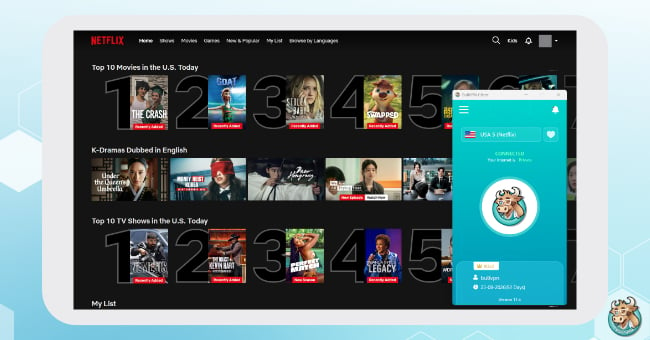
- Next, open BullVPN and connect to a server. We recommend starting with fast locations such as the USA, Hong Kong, Japan, EU, or Thailand. You can choose BullVPN servers such as USA 1-6, Hong Kong 1-4, Japan 1-5, or Thailand 1-40. If you want to access Thai websites or apps while in China, try a VPN Server Thailand or TH for China for a better VPN in China experience.
- If you cannot connect on the first try, select another server, such as Hong Kong, Japan, Korea, Singapore, or other servers prepared by BullVPN. Changing servers is one of the basic ways to improve your China VPN connection in some areas.
- If the VPN connection takes too long and times out, check your Wi-Fi signal or mobile signal. You can test your internet speed with the SpeedTest app. VPN for China connection issues may not always come from the VPN itself. Sometimes, the current internet network may also be unstable or restrictive.
- Repeat these steps around 4-5 times. If you still cannot connect, contact the support team and send logs or screenshots via any support channel or WeChat: bullvpn. This helps the team check your China VPN issue more accurately.
Recommended Servers When Using BullVPN from China
BullVPN provides special Server for China options specifically designed for users in China. If you want to use general social media apps such as Facebook, LINE, or Instagram, we recommend connecting to servers that end with “for China” for easier connection.
If you want to watch Thai streaming services such as Netflix, Disney+, or TikTok, we recommend choosing Thailand Server or TH for China.
- TH for China is suitable for users in China who want to connect to a Thai VPN server. It helps you watch movies, listen to music, and follow news from Thailand more smoothly.
- CA for China is suitable for users who want to connect to a server in Canada.
- US for China is suitable for users who want to connect to a server in the United States.
- UK for China is suitable for users who want to connect to a server in the United Kingdom.
- RO for China is suitable for users in China who want to browse as if they were in Romania. This helps access websites, apps, or services that support Romania or European locations.
- RU for China is suitable for users in China who want to browse as if they were in Russia. This helps access websites, apps, or services that support Russian locations.
Common Issues When Using BullVPN in China
Basic Troubleshooting Steps for All Clients
These basic steps can be used on all clients, including Windows, iPhone, iPad, Mac, and Android.
- Check the BullVPN version you are using. We recommend keeping the app updated to the latest version at all times.
- Try switching to a new server by choosing a server that is suitable for use in China.
- Tap Reload Server, then select and connect to a new server again.
- Change the connection Protocol. If you are using BullVPN in China, we recommend trying IKEv2 or OpenVPN.
- As a basic step, try switching to a nearby country server or a server suitable for use from China 2-3 times. While connecting, let the system complete the connection process on its own.
- If you still cannot connect or see a Connected fail message, switch to another server and reconnect again. Choosing the right server directly affects your VPN for China experience.
BullVPN Keeps Disconnecting Frequently
First, check your internet connection. Having internet access does not always mean that a VPN will work properly. If your internet speed is unstable or your Wi-Fi connection keeps dropping, the VPN connection may disconnect as well.
VPN works best when used with a stable internet connection, especially when using a VPN in China, where network restrictions may vary depending on the area and internet provider.
You can test your internet speed before and after connecting to the VPN here:
https://speedtest.adslthailand.com/
Common factors that may cause frequent VPN disconnections include slow internet, too many people sharing the same network, or weak mobile/Wi-Fi signal. For example, if your mobile signal or Wi-Fi only shows 1-2 bars, the VPN may disconnect because the connection is not stable enough.
In this case, try reconnecting, switching to another server location, or waiting for a while before connecting again. You can also try moving to a spot with a stronger signal before using the VPN.
If you suspect that the issue may come from the VPN server, you can contact the BullVPN team to help test the server. This is an important step for users who are using a China VPN and experience disconnections from time to time.
As a basic step, try switching to a nearby country server 2-3 times. While connecting, let the system complete the connection process on its own. If you cannot connect or see a Connected fail message, switch to another server and reconnect again. Choosing the right server directly affects your VPN for China experience.
Note: The reason you may need to try switching servers several times is to check whether your current internet connection is blocking the VPN or the IP Address of the server you are connected to. If it is blocked, you may not be able to connect, or the connection may be difficult at certain times. Don’t worry, you can contact the BullVPN team for further assistance, especially when using a VPN in China, where some areas or networks may have more restrictions than usual.
Cannot Connect to BullVPN on Windows
If you are using BullVPN on Windows and cannot connect, please check the following steps first.
- First, check your Windows version by going to the Windows Update menu.
- BullVPN supports Windows 11 and above, and your system should be marked as Up to date.
- If you are using a Windows version lower than Windows 11, we recommend changing the Protocol to OpenVPN.
- If you are using a university Wi-Fi or office Wi-Fi, try switching to mobile internet and reconnecting to BullVPN again. University or office networks often block VPN connections.
- Next, try changing the Protocol in the BullVPN app:
Menu → Setting → Connection → Protocol
Select IKEv2, then tap SAVE and reconnect again.
If it still does not work, change the Protocol to OpenVPN, tap SAVE, and try connecting again.
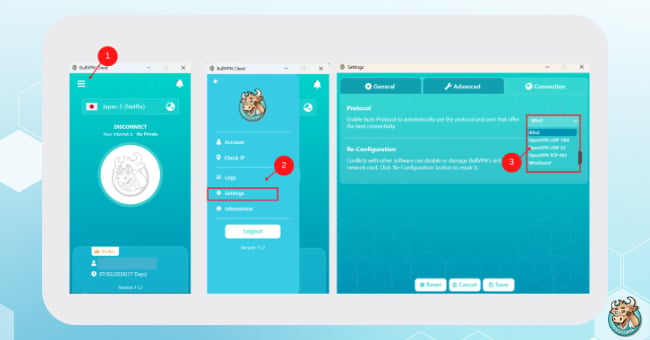
If you still cannot connect, try switching to another Server. For users in China, we recommend choosing Server for China, which is specially set up for use in China. Sometimes, certain Servers or Protocols may work better depending on the network you are using.
Cannot Connect to BullVPN on iOS
If you are using BullVPN on iPhone, iPad, or Mac and cannot connect, we recommend creating a new VPN Profile first.
Go to:
Menu → Setting → Re-certificate or Reconfig
This will create a new VPN Profile.
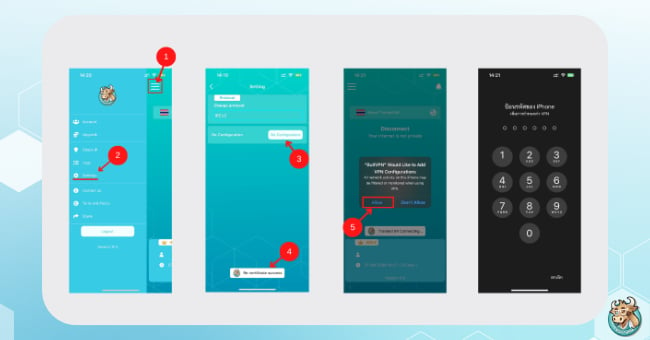
After that, try connecting again. For iPhone or iPad users who are in China and need to use a VPN for China, please make sure all system connection permissions are accepted before using the app.
Another common issue is that another VPN profile may still remain on the device, which can conflict with BullVPN’s connection.
If you have used another VPN before, please check the following:
- Settings → VPN
- Delete all previous VPN Profiles and keep only BullVPN.
- Then go back to the BullVPN app, select a Server, and reconnect.
- If you are using university Wi-Fi or office Wi-Fi, try switching to mobile internet and reconnecting again.
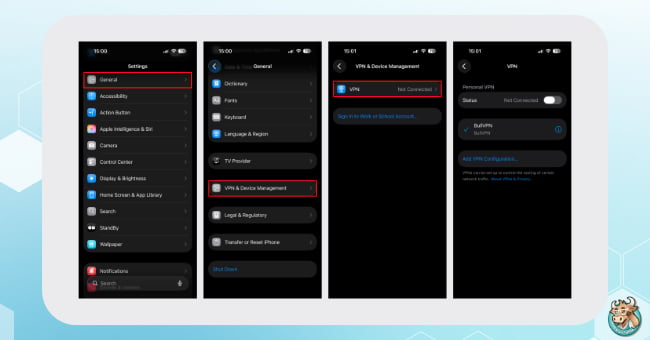
If you have followed the steps above and still cannot connect, try these steps:
- Log out of the BullVPN app
- Restart your device once
- Log in to the BullVPN app again
- Go to Setting and tap Re-cert or Re-certificate
- Connect to any Server for China
- Accept all connection permissions
- Wait for the connection If it still cannot connect, try switching to these Servers:
- TH42 for China
- TH10 for China
- CA2 for China
- DE4 for China
Lastly, if you still cannot connect or use the service, the internet network you are using may be blocking VPN connections. We recommend switching to another internet network or contacting the BullVPN team for further assistance.
Cannot Connect to BullVPN on Android
If you are using BullVPN on Android and cannot connect, we recommend checking whether another VPN is currently connected or still remaining on your device. A previously installed VPN may conflict with BullVPN’s connection.
Please check the following:
- Check whether another VPN is connected or still active
- If there is another VPN Profile, remove it first
- If you are using university Wi-Fi or office Wi-Fi, try switching to mobile internet and reconnecting to BullVPN again
Then try changing the Protocol in the BullVPN app:
Menu → Setting → Connection → Protocol
Select IKEv2, then tap SAVE and reconnect again.
If it still does not work, change the Protocol to OpenVPN, tap SAVE, and try connecting again.
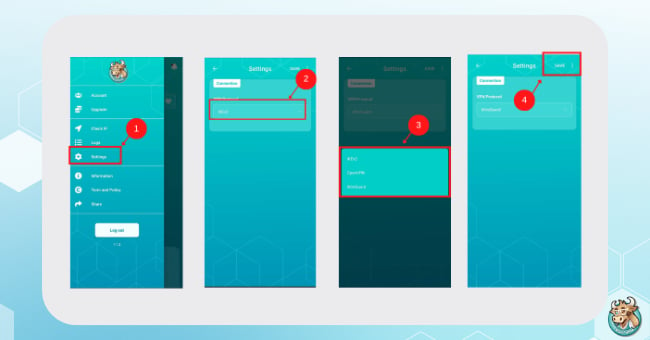
For VPNs that work in China, you may need to try several servers to find one that suits your network. It's recommended to select a Server VPN for China specifically for China first.
If you have already removed other VPN Profiles but still cannot connect, try the steps below.
- Logout from the BullVPN app.
- Restart your device once.
- Login to the BullVPN app again.
- Connect to any Server for China.
- Accept all connection permissions.
- Wait for the connection. If it still does not connect, try switching to one of these servers:
- TH42 for China
- TH10 for China
- CA2 for China
- DE4 for China
Lastly, if you still cannot connect or use the service, your current internet connection may be blocking VPN usage. We recommend switching to another internet network or contacting the BullVPN team for further assistance.
Downloaded BullVPN on macOS but It Does Not Work or Shows a Black Screen
If you open the BullVPN app on macOS and see a black screen, or if the app cannot be used properly, we recommend checking whether your BullVPN app is updated to the latest version first. If it is not the latest version, please update the app before using it again.
If you have already updated the app but still experience the issue, you can contact the BullVPN team for assistance. This is especially useful for macOS users traveling to China who need a China VPN for work, study, or accessing important websites.
Other Challenges to Prepare for When Traveling to China
- Do not uninstall the apps or programs you downloaded and installed before traveling to China. If you delete them, it may be difficult or impossible to reinstall them later. If you need a China VPN, install and test it before leaving your home country.
- Apps such as LINE, Facebook, Twitter, TikTok TH, Netflix, Hotstar TH, and others may not work normally in China. If you plan to use BullVPN in China, we recommend testing BullVPN before your trip. A VPN in China should be prepared before actual use, not after you arrive and urgently need it.
- Wi-Fi shared by many users can be slow and unstable. We recommend using an internet connection with at least 2MB speed for a smoother experience. This helps your VPN for China connection work more smoothly.
In short, if you are traveling to China and wondering which VPN should I use in China, choose a VPN that is easy to install, supports multiple devices, offers multiple server options, and has a support team ready to help when connection issues happen. BullVPN is one option for users who need a China VPN before and during their trip.
List of websites and programs banned by China
- Gmail
- LINE Application
- Google Drive
- Google Map
- Youtube
- X (Twitter)
- Microsoft
- Dropbox
- Vimeo
- Team
- Telegram
- Netflix
- Disney
- viu
- iQIYI
- TrueID
And there are many other websites blocked by the Chinese government. If you cannot access the websites you need, you can contact the BullVPN team for assistance. You can also ask the team which server is suitable for your China VPN usage.
You can see more of the latest blocked websites in China at :
https://www.bullvpn.com/blog/detail/website-blocked-in-china
For anyone interested in studying in China with the Thai-Chinese Student Association (TCSA), more information can be found at :
https://www.bullvpn.com/blog/detail/tcsa-study-in-china-vpn-bullvpn

BullVPN is a VPN service for general users, students, workers, travelers, and anyone who needs a China VPN while staying in China. It is also suitable for users looking for a VPN that works in China, VPN China, a Thai VPN server, or a tool that helps hide IP Address for better online privacy.
If you are planning to travel to China and wondering which VPN should I use in China, BullVPN is one option that helps you prepare before departure. It supports multiple devices, provides multiple server locations, supports VPN in China usage, and has a support team ready to help when connection issues happen.
BullVPN will give you freedom internet world through block restrictions.
✅ Hide your IP address
✅ Access blocked websites
✅ VPN servers in 300 Servers in 49 countries
✅ Lag reduced and ping Games
✅ Supports Windows, Mac, iPhone, Android, Chrome Extension, Android TV
✅ Trusted by over a hundred thousand users worldwide