

Traveling abroad has become the norm for the new generation, whether for leisure, work, or study. One of the most common questions people ask is “What is roaming?” and how necessary it is when traveling overseas. In this article, we’ll explain roaming in an easy-to-understand way, compare its pros and cons, and introduce a more cost-effective alternative like a VPN for those who want safe internet access at a controllable price. ✈️🌍
What is Roaming?
Many of you have probably heard this term before and might have wondered exactly what "Roaming" means when scrolling through your smartphone's settings menu. To put it simply, roaming is the process of connecting your mobile network to a service provider’s network in your destination country. This allows you to make and receive calls, send text messages (SMS), and use the internet immediately, even when you are in a different country from where your active SIM card is registered.
What is Mobile Roaming? 📱
Specifically, mobile roaming refers to using your "original phone number" from your home country to make and receive calls while traveling abroad. The system will automatically search for and connect to a partner telecommunications network in the country you are visiting.
What is Data Roaming? 🌐
Data roaming, on the other hand, is the use of internet data services through your current network provider while overseas. The charges incurred from this usage are billed back to your home country's mobile operator, simply put, they are added to your regular monthly phone bill. This is exactly where users need to be careful; if you haven't subscribed to a supported roaming package beforehand, it can lead to massive excess data charges.

How Does Roaming Work?
The way roaming works is very simple. When traveling abroad and turning on mobile roaming, your phone will search for a network paired with your current service provider (like AIS, TRUE, or DTAC). From then on, all your usage (calls, messages, internet) will be routed back and billed by your home network, added to your mobile plan in your next billing cycle.
1. Network Handshake
When you arrive in a foreign country and turn on your phone or disable airplane mode, your smartphone will start scanning for signals in the area and attempt to connect to a local network (Visited Network). For example, if you go to Japan, your phone might look for Docomo or SoftBank cell towers.
2. Authentication & Authorization
When the network in Japan detects your SIM card, the system instantly knows it's not a local SIM. The Japanese network then sends your SIM's ID data (IMSI) across the globe back to your home provider in Thailand (like AIS, TRUE, DTAC) to ask: "Who is this customer? Have they activated a roaming package? And do we have a partnership agreement?" If your Thai mobile carrier approves, your smartphone will display the foreign network's name on the screen, ready for use.
3. Data Routing & Tunneling
This is the crucial part that many people don't know. When you use Data Roaming, your search queries or app traffic don't go out to the internet directly through the destination country's servers. Instead, the system creates a "Data Tunnel," sending all data flying across continents back to your mobile carrier's servers in Thailand first, before heading out to the internet.
The Result: When you browse the internet using roaming abroad, your IP Address remains Thai (allowing you to access Thai websites normally). However, this comes at the cost of higher latency (Ping) because the data has to travel a long distance.
4. Billing Process
For every usage, whether it's the minutes called, SMS sent, or Data consumed, the foreign network will record the data and send the bill (TAP Files) back to charge your Thai mobile carrier. Your Thai carrier will then add these totals to your monthly mobile plan in the next billing cycle.

Pros and Cons of Roaming
Brother Cow has summarized the pros and cons of using international roaming to give you the clearest overview and make it easier to decide before you fly.
Pros of Using Roaming ✅
- Extremely convenient. You can use your existing number right away and never miss a contact.
- No need to waste time buying a new SIM, removing your old one, or dealing with the hassle of renting a Pocket WiFi.
- Highly suitable for those doing business or waiting for important calls from work.
- Very crucial for receiving SMS or OTP codes from Thai banks for financial transactions.
Cons of Using Roaming ❌
- Costs are relatively higher compared to other options in the market.
- There is a risk of accidentally leaving Data Roaming on without knowing, causing your monthly bill to skyrocket.
- If you use up your data quota, roaming internet speeds are often drastically reduced (FUP) to the point where it's barely usable.
4 Things to Know Before Activating Roaming to Avoid Sky-High Bills
Just knowing what roaming is might not be enough. Brother Cow is here to add some essential tips that travelers must know before turning it on.
1. Always Check Your Package Before Traveling
Turning on roaming without subscribing to an add-on package is a risk that could tear a hole in your wallet. Always check with your mobile carrier.
2. Beware of Data Leaks
Applications might pull data for background updates. You should go into your settings and turn off Background App Refresh.
3. Check for Partner Networks
If your device connects to a network that isn't partnered with your Thai mobile carrier, roaming charges could skyrocket.
4. Receiving Calls Costs Money Too
Roaming is essentially renting cross-border signals. Therefore, answering incoming calls from Thailand while abroad will also incur charges.
Roaming vs. Foreign SIM vs. Pocket WiFi vs. VPN: Which One Should You Choose?
Many people often hesitate whether to turn on roaming, buy a foreign SIM, or carry a Pocket WiFi. So, Brother Cow has brought the 4 most popular choices of 2026 to compare side by side. Let's see which option best answers your travel style.
|
Connection |
Phone Number Usage |
Overall Cost |
Portability / Convenience |
Data Security |
Best Suited For |
|
Roaming |
Can use original Thai number to receive calls and OTP immediately |
Highest (Based on international packages) |
Very High (Uses only your existing smartphone) |
Moderate (Based on destination network standards) |
Business people, those who need to receive important calls and OTP codes |
|
Foreign SIM (eSIM) |
Must use a new number / Cannot receive calls to Thai number |
Moderate to Cheap (Depends on data volume) |
Moderate (May need to physically swap SIM if not using eSIM) |
Moderate (Based on destination network standards) |
Those focusing on budget-friendly internet usage |
|
Pocket WiFi |
Does not support making or receiving calls |
Cheap (When the cost is split among friends) |
Low (Requires carrying an extra device and keeping it charged) |
Moderate (Password shared only within the group) |
Groups of friends or families traveling together |
|
VPN (e.g., BullVPN) |
Not related to calling (Used alongside an internet connection) |
Most Cost-Effective (Starts at just tens of baht per day) |
Very High (It is simply an application on your device) |
Highest (Data is encrypted to prevent hacking) |
Those who prioritize secure internet, bypassing geo-blocks, and streaming |
What is a VPN? 🐮
At this point, many people might be starting to wonder what is a VPN and why it has become a frequently mentioned technology alongside traveling.
A VPN (Virtual Private Network) is a technology that encrypts your computer data and reroutes your internet traffic to servers in various countries around the world. This allows us to simulate our location (IP Address) and use the internet just as if we were actually in that country.
Advantages of a VPN
- Ultimate Security: All data is encrypted, making your connection to free Wi-Fi at airports or foreign cafes safe from hackers intercepting your information.
- Cost-Effective: It is many times cheaper than turning on Data Roaming. You can buy the app, keep it on your device, and use it perfectly alongside a local SIM or eSIM.
- Access Content Worldwide: It solves the problem of going abroad and not being able to watch Thai Netflix series, Thai YouTube news, or access apps blocked in certain countries (like going to China and not being able to use normal social media). A VPN helps bypass all these blocks.
- Easy to Use: Just download the application, select your destination country, press the connect button, and it's ready to use instantly.
When to Use Roaming and When to Use a VPN
- Roaming is suitable for business people who need to use their original number to receive urgent calls from customers, or need to leave roaming on to receive SMS / OTPs (It is recommended to only turn on voice roaming and turn off data roaming to save your budget).
- VPN is suitable for those who want to use the internet from a foreign SIM or hotel Wi-Fi and want freedom in surfing the web. It is ideal for those who want to watch Thai streaming, prevent personal data leaks, and keep their internet expenses strictly under control.
Why is BullVPN a Better Choice Than Roaming?
If we compare cost-effectiveness and security, using BullVPN is considered a far superior option to roaming in many ways.
- Global Server Coverage: No matter which country you travel to, you can easily switch your routing back to enjoy a Thailand-style internet experience.
- International-Level Data Protection: Eliminate the worry of your credit card information being stolen when making transactions over public Wi-Fi.
- Budget-Friendly: Starting at just tens of baht, but buying a monthly or yearly package is even more cost-effective.
- Easy to Use: Register for a single ID and you can log in to use it comprehensively across smartphones, tablets, and computers.
Furthermore, BullVPN helps you bypass website blocks, access streaming services, or even use apps that are normally only available in specific countries. You could definitely say it is ‘many times more worthwhile than turning on roaming.’

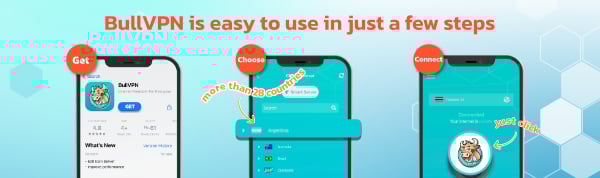
Get started with BullVPN in 3 steps
✅Download and Setup
BullVPN is available for Android, iOS, Windows, macOS, Chrome Extension and Android TV
✅Open the application, log in and select the server
More than 300 Servers are available in 49 countries around the world
✅Connect successfully can be used immediately
After successfully connecting BullVPN, you can access your data freely, without limits