

In an era where internet connectivity is an essential part of daily life, whether working through Cloud systems, conducting financial transactions online, or enjoying streaming services, cybersecurity is no longer a distant concern. Many people may think that creating a complex password is sufficient. However, in reality, a password is the most fragile first line of defense. In this article, BullVPN will introduce you to 2FA, the tool that will transform your online accounts into a fortress that is difficult to breach.
2FA: What is Two-Factor Authentication?
2FA is a Two-Factor Authentication system. This security process requires users to provide two different forms of identification before gaining access to a system. To visualize this, using only a password is like locking your house with a single key. In contrast, enabling 2FA Auth is like adding an extra deadbolt that requires a completely different type of key to open.

How Does 2FA Work?
It operates based on three primary factors that users must provide.
- Password: A password or PIN that you create.
- OTP / Authenticator: A temporary code sent to your mobile phone or generated via an application.
- Biometric: A fingerprint scan, facial recognition, or iris scan.
Examples of 2FA in Practice
When logging into Gmail, Facebook, or other services, after entering your password as the first layer, the system will require you to enter an OTP sent via SMS or confirm the login through a 2FA Authenticator application as the second layer. If either of these layers is missing, you will be unable to access the account entirely.

How many types of 2FA Authenticators are there?
If we categorize 2FA Authenticators based on their usage characteristics and the technology used to generate verification codes, they can be divided into four main types as follows.
1. App-based Authenticators
This is the most popular and secure category for general users. It works by utilizing the capabilities of a smartphone to generate codes known as TOTP (Time-based One-Time Password).
How it works
The application generates a six-digit code that refreshes every 30 to 60 seconds. This process does not require an internet connection or SMS signals.
Examples
- Google Authenticator
- Microsoft Authenticator
- Authy
2. SMS and Email-based Authenticators
This is the most familiar format for many people. However, in terms of security, it is considered less effective than app-based methods.
How it works
After you enter your password, the system sends an OTP code via SMS or email for you to enter and confirm your identity once again.
Precautions
There is a risk of data interception through phishing or SIM Swapping. Additionally, if you are in a location without a mobile signal, you will be unable to receive the verification code.
3. Hardware Authenticators
This is considered the highest security standard (Enterprise Level). It is commonly used in organizations that require strict security measures.
How it works
It is a device similar to a Flash Drive known as a Security Key. It must be plugged into a computer or tapped via NFC on a mobile phone to verify identity without the need to enter any numbers.
Examples
- YubiKey
- Google Titan Security Key
4. Biometric Authenticators
This involves using an individual's unique physical characteristics as a second layer of identity verification.
How it works
It utilizes fingerprint scanning, facial recognition (Face ID), or iris scanning.
Advantages
It is extremely difficult to forge and offers the greatest convenience because there is no need to memorize codes or carry extra devices.
Why Passwords Alone Are No Longer Sufficient
Global Data Breach statistics indicate that passwords alone can no longer protect against sophisticated attacks. Hackers utilize numerous methods to steal your information, such as:
- Credential Stuffing: Using sets of leaked passwords from one website to attempt unauthorized access on various other sites.
- Phishing: Creating fraudulent websites to deceive victims into voluntarily entering their own passwords.
- Phishing Emails: Sending deceptive emails containing malicious links to install malware designed to intercept and capture data.
The Problem with Passwords
Most users tend to create passwords that are too easy to remember, such as birthdays or phone numbers. More importantly, they often reuse the same password across all services. When a password from one website is leaked to the Dark Web, hackers can immediately access all of your other accounts if there is no 2FA system in place to block them.
Example Hacking Scenarios
Suppose you use free, unprotected coffee shop Wi-Fi. This highlights Public Wi-Fi risks, where hackers can perform sniffing to capture your password. If that account lacks 2FA, the hacker can immediately change your password and take full control of your account.

Limitations of 2FA You Should Know
Even though it is highly secure, 2FA has limitations that users must be aware of.
Carelessness
Losing a device installed with an authenticator app without having a backup can result in being locked out of your own accounts.
New Forms of Phishing
Real-time Phishing involves tricking victims into entering both their password and 2FA code simultaneously on a fraudulent website.
Simple Ways to Start Using 2FA
- Go to the Settings menu of the application or website you are using.
- Navigate to the Security section.
- Select and enable Two-Factor Authentication (2FA).
- Use a 2FA Authenticator app to scan the QR Code that appears on the screen.
- Crucially, record your Backup Codes or recovery codes and store them in a safe place (other than on your computer).
Cybersecurity protection relies on multiple factors working together. Enabling 2FA is a fundamental step that enhances security, protecting against password interception, phishing scams, and various other threats. Activating 2FA is like adding a second deadbolt to your home's door. It is highly recommended to use a 2FA Authenticator app, as it offers significantly higher security than receiving standard OTPs via SMS.
In addition to authentication systems, another factor that should not be overlooked is data protection while traveling, especially when using public Wi-Fi in various locations which can be a major vulnerability for data leaks. Choosing a secure and user-friendly VPN like BullVPN helps encrypt your data and mask your identity. Whether you are working or accessing entertainment from anywhere, you can be confident that your sensitive information remains private and definitely safe from cyberattacks.
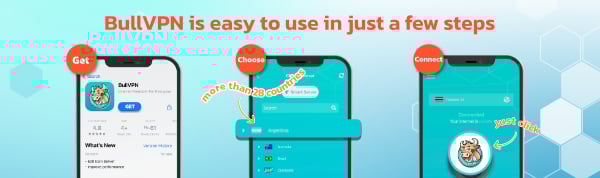
Get started with BullVPN in 3 steps
✅Download and Setup
BullVPN is available for Android, iOS, Windows, macOS, Chrome Extension and Android TV
✅Open the application, log in and select the server
More than 300 Servers are available in 49 countries around the world
✅Connect successfully can be used immediately
After successfully connecting BullVPN, you can access your data freely, without limits
