
These days, we do almost everything online, from using social media and streaming movies to working and making online transactions. As a result, online privacy has become more important than ever. One tool that often comes up in conversations about privacy is a VPN, as it can help improve privacy and protect your internet connection.
But there is another common question: Does a VPN keep your data? Does a VPN store your browsing history? Since your internet traffic passes through a VPN server before reaching the internet, what can the VPN provider actually see or store about you? Big Bull will break it down step by step in simple terms.
What Is a VPN and How Does It Work?
Before answering whether a VPN stores your data, it helps to understand what is VPN. A VPN, or Virtual Private Network, is a technology that creates a secure connection between your device and a VPN server. Data traveling through this connection is encrypted before being sent to the internet.
When you connect to a VPN, websites will usually see the VPN server's IP address instead of the real IP address assigned by your network. This helps hide IP address and reduces the amount of network information directly exposed online.
Think of it this way: instead of traveling directly from your home to a website, your connection first goes through an intermediary point that encrypts the route and forwards your data. That is the basic idea behind how a VPN works.
However, a VPN does not make you 100% invisible online, nor does it protect you from every type of threat. It cannot fully prevent phishing, malware, or the consequences of entering your password on a fake website. A VPN should therefore be used alongside safe online habits.
How Does a VPN Improve Privacy and Security?
One of the main reasons people use a VPN is to improve online privacy and security, especially when connecting through networks they do not control.
When a VPN is active, data traveling between your device and the VPN server is encrypted, making it much harder for other people on the same network to read information traveling through that connection.
Websites will also usually see the VPN server's IP address instead of your real IP address. This can help reduce exposure of your approximate location based on your IP and limit some of the destination information your Internet Service Provider, or ISP, can directly see.
However, your ISP can still know that you are connected to the internet and that traffic is being sent to a VPN server. The difference is that the contents of the VPN connection are encrypted, limiting how much information can be observed.
When Is a VPN Useful?
A VPN can be useful in many situations, such as when connecting to public Wi-Fi at airports, hotels, cafés, or co-working spaces, where you may not know how securely the network has been configured.
It can also be helpful when traveling abroad and using unfamiliar networks, or when you want to connect through a server located in another country for a particular use case.
However, access to websites and online services still depends on each provider's policies, terms of service, and local laws. A VPN can change how your internet traffic is routed, but that does not mean it can bypass every restriction imposed by every service.
What Data Does a VPN Store?
Now to the most important question: Does a VPN store your data? A VPN provider may need to process or retain certain types of information in order to operate its service. This could include the email address used to create an account, subscription or payment information, the number of connected devices, technical information used for troubleshooting, or certain connection-related data.
The exact information collected varies between providers. That is why the important question is not simply whether a VPN “collects data” or “doesn't collect data.”
You should look deeper at what information is collected, how long it is retained, and what it is used for, especially when it comes to information about your internet activity.
Does a VPN Store Your Browsing History?
There is no single answer that applies to every VPN provider because each company has its own data practices.
Technically, your internet traffic passes through the VPN provider's servers before reaching the internet. This is why choosing a trustworthy VPN provider matters.
Some VPN services may retain only technical information required to operate their service, while others may keep connection logs or additional data.
Before subscribing, check whether the provider records the websites you visit, stores your original IP address, keeps connection data, how long that data is retained, and whether any information is shared with third parties.
If a Privacy Policy feels extremely vague or does not clearly explain what information the VPN collects, Big Bull recommends holding off before subscribing.
What Is a No-Log Policy?
A No-Log Policy, sometimes called a No-Logs Policy, is a term commonly used by VPN providers. In general, it means that the provider states that it does not record certain types of users' online activity, such as browsing history.
However, “No-Log” does not necessarily mean exactly the same thing for every company.
A VPN may not store browsing activity but could still need to retain an email address, account information, payment details, or certain technical information required to operate the service.
That is why you should not rely only on a large “No-Log” claim displayed on a VPN provider's website. Read the Privacy Policy to understand exactly what the provider does not collect, what it does collect, and how long the information is retained.
A clear and easy-to-understand privacy policy can often tell you more than a short marketing claim.
Is a VPN Safe?
If you are wondering whether a VPN is safe, the answer is that a VPN can improve the security and privacy of your internet connection. However, how safe a VPN is depends on several factors, including the VPN provider, the protocol being used, encryption standards, and your own online behavior.
A trustworthy VPN should support widely used VPN protocols such as WireGuard, OpenVPN, or IKEv2, along with clear policies explaining how user data is handled.
But even the most secure VPN cannot protect you from everything. If you click a phishing link, download malicious software, or enter your password into a fake website, a VPN cannot completely prevent the damage.
A VPN should therefore be viewed as one layer of online security rather than a shield against every threat on the internet.

Are Free VPNs Safe?
Another common question is: Are free VPNs safe?
It would not be accurate to say that every free VPN is unsafe. Some services may be trustworthy, while others deserve more caution. However, it is worth remembering that operating a VPN costs money, including server infrastructure, bandwidth, app development, security, and system maintenance.
If you are not paying for the service, consider how the provider generates revenue.
Some free VPNs may limit speed or data usage. Others may rely on advertising, while certain providers may have data practices that users do not expect.
Before downloading a free VPN, check who operates the service, whether it has a Privacy Policy, what logging practices it follows, whether the app requests unnecessary device permissions, and whether it supports trustworthy encryption standards and VPN protocols.
If you can barely find any information about these areas, it is worth being especially cautious.
When Should You Turn On a VPN?
There is no single rule for when you should use a VPN because it depends on how you use the internet.
Some situations where a VPN can be particularly useful include using public Wi-Fi, traveling abroad, connecting through unfamiliar networks, or reducing the exposure of your real IP address to websites.
For people who frequently work outside the home or regularly connect to Wi-Fi at hotels, cafés, and airports, turning on a VPN before using the internet can be another way to improve connection privacy.
Should You Keep a VPN On All the Time?
Can you keep a VPN running 24/7? Yes. But it may not be necessary for everyone.
Keeping your VPN connected means most of your internet traffic continues to travel through an encrypted VPN connection while helping hide your real IP address from websites.
However, a VPN may slightly reduce connection speed or increase latency because your traffic needs to travel through an additional VPN server.
Certain services, such as banking systems, websites with strict security checks, or applications that are sensitive to changing IP addresses, may also request additional identity verification.
If you do not need a VPN running continuously, you can simply turn it on when it is useful.
VPN Risks and Things You Should Know
VPNs offer several benefits, but there are also important things to keep in mind.
First, avoid choosing a VPN based on price alone. Your internet traffic travels through infrastructure operated by the VPN provider, so it is worth checking the company's reputation, Privacy Policy, security practices, and customer support.
You should also be skeptical of marketing claims suggesting that a VPN makes you “100% untraceable.”
Websites may still identify or track users through logged-in accounts, cookies, browser fingerprinting, and other information collected from devices or browsers.
A VPN also cannot replace antivirus software, a password manager, Two-Factor Authentication, or careful behavior around phishing websites.
The safest approach is to use multiple security tools together.
How to Choose a Safe VPN
If you are choosing a VPN for long-term use, consider the following factors:
- Choose a provider with clear company information and contact channels.
- Read its Privacy Policy and No-Log Policy.
- Check whether the VPN supports widely used VPN protocols.
- Find out what information is collected and how long it is retained.
- Avoid apps that request unnecessary permissions.
- Choose a service with server locations that match your needs.
- Consider speed, stability, and device compatibility.
- Look for accessible customer support in case you experience problems.
If you are looking for a VPN for everyday use, BullVPN is another option that supports multiple device types and lets users choose servers in different countries depending on their needs.
Before subscribing to BullVPN or any other VPN service, you should always review the package details, Terms of Service, and Privacy Policy to make sure the service is suitable for your needs.

Does a VPN keep your data? There is no single answer that applies to every VPN service because each provider follows different data collection and retention policies.
A VPN may need certain information to operate its service, such as account details, payment information, or technical data. What matters most is understanding what the provider collects, what it does not collect, and how the information is used, especially when it comes to browsing history and online activity.
So, if you are deciding whether a VPN is safe, do not look only at server numbers or connection speed. You should also consider VPN security, the Privacy Policy, the No-Log Policy, and the provider's overall reputation.
When you choose a suitable service, a VPN can help encrypt your internet connection, reduce exposure of your real IP address, and improve your privacy while using the internet.
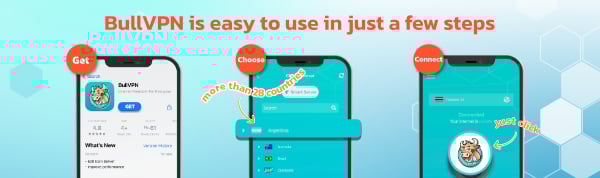
Get started with BullVPN in 3 steps
✅Download and Setup
BullVPN is available for Android, iOS, Windows, macOS, Chrome Extension and Android TV
✅Open the application, log in and select the server
More than 300 Servers are available in 49 countries around the world
✅Connect successfully can be used immediately
After successfully connecting BullVPN, you can access your data freely, without limits