
In an era where scrolling social media or streaming shows is a daily ritual, many of us have hit the dreaded "Content Not Available in Your Country" message or found certain websites blocked. This leads many to look for tools to bypass these restrictions.
The term Proxy often pops up alongside VPN, but what exactly is it? How does it work? And how does it differ from a VPN? Today, Big Bull is going to dive deep into the details to clear up the confusion and share techniques to upgrade your IP Address security to a "god-tier" level. Let’s get into it!
What is a Proxy?
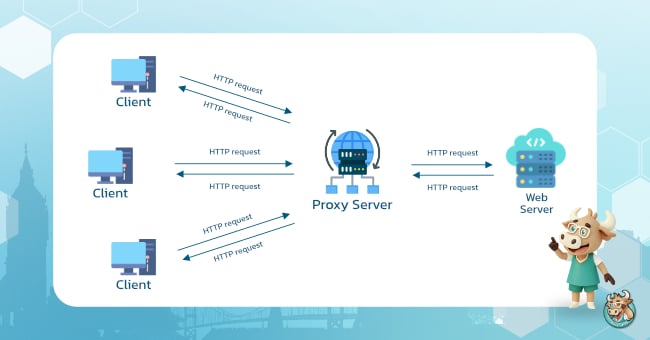
When you surf the internet normally, your device sends a Request directly to the website's server. Using a Proxy means placing a "middleman" between you and the outside world.
Imagine having a personal secretary: you give them your food order, and they go to the restaurant to buy it for you. The restaurant never sees your face, they only see the secretary.
In technical terms: A Proxy is a type of server acting as a gateway between the user and the internet. When you access a website, the Proxy handles the request on your behalf, making the destination see the Proxy’s IP Address instead of your actual device's IP.
How a Proxy Works
Its operation is simpler than you’d think, it efficiently filters and forwards data. The main process involves receiving a command from your device and checking if that data is already in its 'Stock' (Cache). If the frequently requested info is already there waiting, it sends it back to you immediately without having to fetch it from a distant original server, helping you load web pages much faster.
Proxy Step-by-Step Process
To make it clearer, imagine that normal web browsing is like walking straight up to a friend's door and knocking. But using a Proxy is like sending a letter to a 'Central Mailbox' first; that mailbox then forwards it to your friend on your behalf. As a result, your friend has no idea who actually sent the letter. Let’s break down the step-by-step process from start to finish to see exactly how it works.
1. User Request
You type a URL or click a movie in your browser (writing the letter).
2. Interception
Instead of going straight to the site, the request hits the Proxy Server first for verification.
3. Processing
The Proxy takes your request and swaps your IP Address with its own to hide IP Address, preventing the destination from tracking you.
4. Server Response
The Proxy contacts the website. When it receives the data (web page or video), it keeps a temporary copy in its stock.
5. Data Delivery
Finally, the Proxy sends the data to your screen. You browse or stream normally, while the destination remains unaware of your true identity.
Types of Proxies
There are several types of Proxies, each functioning differently. Choosing the right one ensures it meets your specific needs.
Forward Proxy
The most popular type used to send data from the inside to the outside web. Everything must pass through this first; it checks which sites are accessible and which are blocked.
- Used to control internet usage in organizations or schools.
- The user is on the "inside" sending requests out.
Transparent Proxy
An intermediary that doesn't hide your identity or IP address. It mostly operates quietly without you even noticing. It doesn't mask your IP and doesn't conceal who you are.
- Mainly used by organizations or ISPs to filter websites or cache data.
- Users are often unaware that a proxy is even working.
Anonymous Proxy
This one focuses on privacy. It won't send your real IP to the destination website, so the site won't know where you are actually located.
- Suitable for those who want a certain level of anonymity.
- However, it doesn't always provide encryption as deep as a VPN.
Reverse Proxy
This is the opposite, it doesn’t protect the user, but protects the "Web Server" instead. It sits in front of the website to handle traffic on behalf of the actual server.
- Helps with Load Balancing.
- Protects against DDoS attacks.
- Increases speed through data caching.

Proxy vs. VPN: What’s the Difference?
While both help you "teleport" to see international content, they operate on completely different levels.
1. Level of Protection
- Proxy: Works at the Application Level. If you set a Proxy in Chrome, only your Chrome traffic is hidden. Other apps like Line or online games will still use your regular, unprotected connection.
- VPN: Works at the Operating System (OS) Level. Once connected, it creates a secure tunnel for your entire device. 100% of your data from every app goes through the VPN.
2. Data Security
- Proxy: Mostly acts as a Pass-through. It usually lacks Encryption. If a hacker intercepts the data, they might still see what you are doing.
- VPN: The heart of a VPN is the Encryption Tunnel. Your data is scrambled into complex code (like AES-256) from start to finish. Even if intercepted, the data is unreadable and useless to hackers.
3. Stability and Traffic Management
- Proxy: Generally more prone to disconnecting because it lacks complex stability protocols. Best for quick, temporary access.
- VPN: Designed for long-term connections with various protocols, making it ideal for long streaming sessions or gaming where a stable IP is required.
Comparison Table: Proxy vs. VPN
|
Feature |
Proxy |
VPN |
|
Scope |
App-specific (e.g., Chrome) |
System-wide (All activities) |
|
Encryption |
None |
High-level (e.g., AES-256) |
|
Privacy |
Hides IP from websites only |
Hides IP and activity from ISP |
|
Stability |
Lower (Disconnects easily) |
Higher (Stable connections) |
|
Setup |
Manual setup per app |
One-click connect for the whole device |
|
Security |
Vulnerable to data attacks |
100% secure from eavesdropping |
Which One Should You Choose?
If you just want to access a basic blocked site or speed up loading times for specific pages, a Proxy is an option.
However, for daily internet users, streamers, social media addicts, or professionals doing online transactions, a VPN is the answer. A VPN doesn't just change your IP; it locks down your personal data so it never falls into the wrong hands.

Level Up Your Security with BullVPN
BullVPN prioritizes your data security through standardized encryption, protecting your online activities whether you're on social media or streaming worldwide content.
Beyond hiding your IP to stop website tracking, it helps bypass ISP throttling and grants smoother access to geo-restricted content.
For those seeking the ultimate level of protection, BullVPN Private VPN offers a dedicated Private Server designed just for you. This ensures maximum stability, zero traffic congestion, and total confidence in protecting your most sensitive information.
If you want internet freedom with higher privacy and stability, choosing a trusted provider like BullVPN is the move you need to make.

Server Private VPN & Proxy from BullVPN
✅ Private VPN service in 13 countries around the world
✅ Suitable for people who want privacy in use Because only you can use Server Private VPN
✅ Increase the security of the organization by using Whitelist IP
✅ Increase the stability of internet usage for playing games, live streaming, watching video streaming, etc
✅ Service fee starts at 700 baht
